
If new buttons or modifications are not appearing on your point of sale screen, this faq explains why it happens and how to resolve it quickly.
Why does this issue happen?To keep the pos fast and reduce network traffic, the system caches product information and button layouts in your browser and on the server. This allows the pos to load instantly and continue working even with poor internet.
There are two layers of caching:
- Browser‑level cache
- Server‑level cache
When an admin updates product information, the system sends signals to all active terminals to refresh their cache. If many changes occur at once, the cache may fall out of sync, requiring a manual refresh.
How do I fix pos buttons not updating?
Step 1: reload your local cart cache
From the pos screen:
- Click the three dots in the top‑right corner
- Select reload cart cache
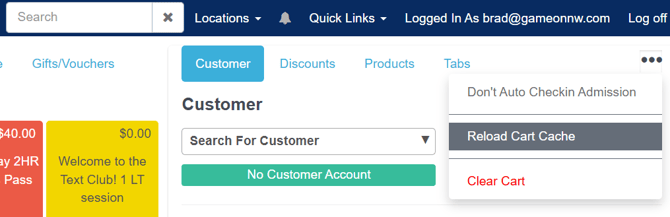
This forces your browser to pull fresh data from the server.
Step 2: rebuild the server cache (admin only)If the local reload doesn’t work, rebuild the server cache:
- Go to settings → rebuild cache
- Type rebuild
- Click the green rebuild cache button
- Return to the pos screen and repeat step 1
This updates the server‑side cache for your location.
What if the buttons still look wrong?
Step 3: verify your terminal profile (admin only)
Your terminal must be assigned to the correct profile, and the profile must contain the button layout you expect.
Check the button layout
- Go to admin tools → terminals → pos buttons
- Select the terminal profile from the dropdown
- Review the button assignments on the first tab
If the layout looks correct, move to the next step.
Step 4: verify your registered terminal (admin only)Your computer must be linked to the correct terminal profile.
- Go to admin tools → terminals → registered terminals
- Find the terminal with current terminal next to its name
- Confirm the assigned profile is the one you want
- If not, edit the terminal and assign the correct profile
A terminal profile defines button layouts and settings. Only one profile can be assigned to a terminal at a time.
SummaryIf pos buttons are not updating:
- Reload your local cache
- Rebuild the server cache (admin)
- Verify the terminal profile (admin)
- Confirm the registered terminal assignment (admin)
Following these steps ensures your pos displays the correct button layout for your terminal.