
High trek pos supports several membership types, each designed for different business models. This FAQ explains season pass memberships, subscription memberships, and in‑progress memberships, along with setup steps, discounts, communication, and redemption rules.
Season pass membershipsSeason pass memberships allow customers to receive free or discounted access to products and services for a defined period—such as a month, season, six months, a year, or a recurring timeframe. When the membership expires or is canceled, the membership code stops working.
Common uses
- Zoos
- Paintball fields
- Laser tag centers
How do I set up a season pass membership?
Step 1: open membership settings
Go to admin tools → membership → types Click create season pass membership.
Step 2: define basic details
- Retail name
- Button name
- Retail price
- Standard product fields
Step 3: choose the membership time period
You can choose:
- Start at time of purchase
- Start on a specific date
Tip: Starting at purchase with a fixed duration (30, 90, 180, 365 days) requires less maintenance.
Step 4: add events or gate admission (optional)
Most operators skip this and instead use discounts and entitlements later.
Step 5: require photo
Enable photo requirements if your venue uses photo ID verification.
Creating membership productsYou can create multiple membership product variations using bundle components:
- Child
- Adult
- Senior
- Infant
- Two‑pack
- Family pack
These products all connect back to the same membership sku.
Membership discounts and entitlementsCreate discounts and benefits associated with the membership, such as:
- 10% off merchandise
- 15% off food and beverage
- 20% off companion tickets
Promote these benefits in your cart and on your website.
Membership emails and communicationCreate a custom email with setup instructions. Include:
- Order id
- Steps to create customers
- Steps to assign memberships
- Photo guidelines
- Tips for saving the digital membership qr code
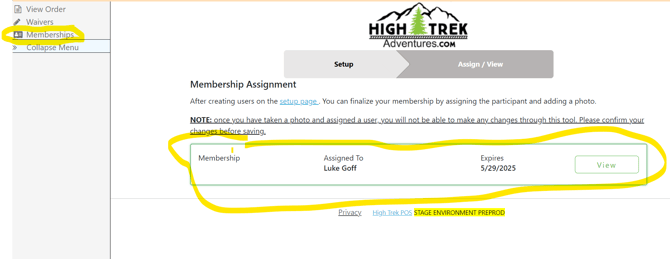
Customers use the membership management portal to:
- Complete waivers
- Assign memberships
- Upload photo ids
Employees can upload photos if needed.
How do customers redeem memberships?
In‑store bookings
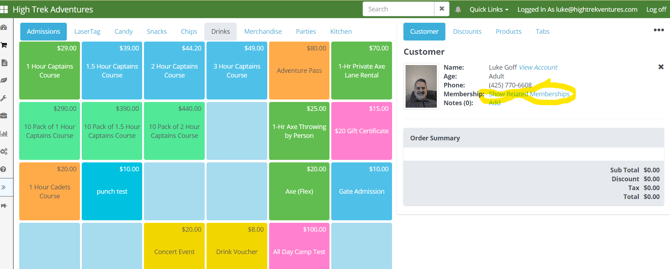
- Pull up the customer in the pos
- Or scan their membership qr code
- Verify identity using the photo on file
- Upload a photo for first‑time visits
- The booking pop‑up shows related memberships for scheduling multiple people
To allow online booking:
- Enable allow online booking in the membership type
- Go to admin tools → carts → categories & products
- Click add category shortcut
- Select add book membership visit
Customers also receive an email with a link to schedule visits.
This works only if the membership is tied to timed events.
Subscription membershipsSubscription memberships use recurring billing to remain active. The recurring cost is the product price.
Common uses
- Climbing gyms
- Community fitness centers
- Kids play centers
Setup is similar to season pass memberships, with additional billing steps.
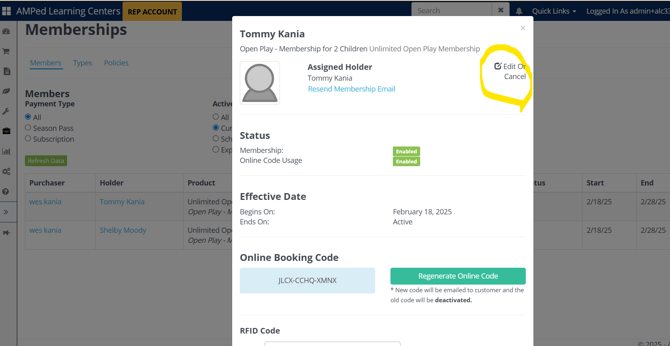
How do I cancel a subscription membership?- Go to admin tools → membership
- Find the member
- Click edit or cancel
All recurring billing customers receive an email 5 days before rebilling (required by visa/mastercard).
You can also:
- Click group waiver: manage link
- Click order management
- Click cancel subscription
Customers cannot cancel the first month online. Later, a cancellation link appears in the membership management tab.
In‑progress memberships (used during migration)When migrating to high trek pos:
- Place an order for the customer at 100% discount
- Modify the membership expiration date to the correct end date
If someone leaves, you can modify the expiration date at any time to deactivate the membership.
Recurring memberships can only be purchased on the subscription cart, which presents the correct subscription policy and handles rebilling.