---
title: What are the lead tool contact and follow up procedures?
description: Lead tool contact and follow‑up procedures for managing quotes, communication attempts, status updates, and closing out leads in High Trek POS.
---
[Skip to content](https://help.hightrekpos.com/kb/what-are-the-lead-tool-contact-and-follow-up-procedures#main-content)
English - United States
Show submenu for translations
[](https://www.hightrekpos.com)
Open main navigation
Close main navigation
- English - United States
Show submenu for translations
- [Contact us](https://www.hightrekpos.com/contact-us.html#contact-form)
[Contact us](https://www.hightrekpos.com/contact-us.html#contact-form)
How can we help you?
- There are no suggestions because the search field is empty.
1. [High Trek POS Platform Knowledge Base](https://help.hightrekpos.com/kb?hsLang=en-us)
2. [Sales & Lead Management](https://help.hightrekpos.com/kb/sales-lead-management?hsLang=en-us)
August 8, 2026
# What are the lead tool contact and follow up procedures?
All sales leads should be handled consistently to ensure timely communication, accurate tracking, and a smooth customer experience. While timing may vary based on customer needs or event urgency, the general workflow below outlines how leads should be processed from first contact through final follow‑up.
**First contact attempt**
All customers who request a quote—via email, phone, or online inquiry—should be contacted within **24 hours**. Ideally, this first contact includes a quote, but you may need additional information before sending one.
### **When creating a quote**
- Add a short, friendly note expressing interest in hosting their event
- Include any relevant details
- Upsell activities that may fit their group

### **Quote expiration**
A **7‑day expiration** is standard, but adjust as needed:
- Shorter if the event is soon
- Longer if the customer needs more time
Always leave at least 7 days for the public to book if the quote is rejected.
### **Update the lead status**
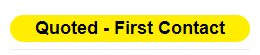
Change status from **new** to the appropriate option in the dropdown.
### **Monitor customer engagement**
Periodically check whether the customer has viewed the quote or email:
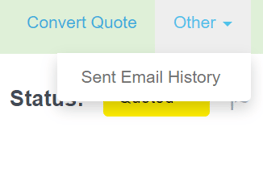
- Click **other → sent email history**
- Review the view/open history
### **If the customer responds**
Change status to **quoted – see communication**. Record internal notes for any phone or email conversations.

**Second attempt (if no response)**
If the customer has not replied within **24–48 hours** after the quote was issued, send a follow‑up message.
### **How to follow up**
- Phone call or voicemail
- Email with the quote link (found under **customer manage**)
Messages should be simple and focused on confirming they received the quote and offering help.
### **Update the status**
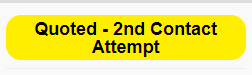
If no response: Set status to **quoted – 2nd contact attempt**.
If they respond: Set status to **quoted – see communication**.
**Third and final attempt (if still no response)**
Make one last attempt using a different communication method than before.
### **Update the status**
Set status to **quoted – 3rd and final contact attempt**.
Leave the lead in this status for **3–5 days**.

**Closing the lead**
After 3–5 days with no response, change the status to **closed**.
### **Important**
Before closing:
- Ensure an employee name is attached to the lead
- If you do not log in under your own name, use **Christy Evans (comcast)**
This ensures the team receives bell notifications if the customer reopens communication after the lead is closed.
- [FAQs](https://help.hightrekpos.com/kb/faqs?hsLang=en-us)
- [Getting started](https://help.hightrekpos.com/kb/getting-started?hsLang=en-us#main-content)
- [Operating Hours](https://help.hightrekpos.com/kb/getting-started?hsLang=en-us#operating-hours)
- [Products](https://help.hightrekpos.com/kb/getting-started?hsLang=en-us#products)
- [Inventory](https://help.hightrekpos.com/kb/getting-started?hsLang=en-us#inventory)
- [Zoos](https://help.hightrekpos.com/kb/getting-started?hsLang=en-us#zoos)
- [Vouchers](https://help.hightrekpos.com/kb/getting-started?hsLang=en-us#vouchers)
- [PCI](https://help.hightrekpos.com/kb/getting-started?hsLang=en-us#pci)
- [Resources](https://help.hightrekpos.com/kb/getting-started?hsLang=en-us#resources)
- [Custom Calendar](https://help.hightrekpos.com/kb/getting-started?hsLang=en-us#custom-calendar)
- [Capacity](https://help.hightrekpos.com/kb/getting-started?hsLang=en-us#capacity)
- [Troubleshooting](https://help.hightrekpos.com/kb/troubleshooting?hsLang=en-us)
- [General](https://help.hightrekpos.com/kb/general?hsLang=en-us#main-content)
- [POS](https://help.hightrekpos.com/kb/general?hsLang=en-us#pos)
- [Reports](https://help.hightrekpos.com/kb/reports?hsLang=en-us)
- [Accounting](https://help.hightrekpos.com/kb/accounting?hsLang=en-us)
- [Hardware](https://help.hightrekpos.com/kb/hardware?hsLang=en-us)
- [Voucher Creation & Redemption](https://help.hightrekpos.com/kb/voucher-creation-redemption?hsLang=en-us)
- [Voucher Systems & Redemption Workflows](https://help.hightrekpos.com/kb/voucher-systems-redemption-workflows?hsLang=en-us)
- [POS Product Modifications & Add‑Ons](https://help.hightrekpos.com/kb/pos-product-modifications-add-ons?hsLang=en-us)
- [Physical Gift Card Production & Redemption](https://help.hightrekpos.com/kb/physical-gift-card-production-redemption?hsLang=en-us)
- [Bulk Voucher Management & Redemption](https://help.hightrekpos.com/kb/bulk-voucher-management-redemption?hsLang=en-us)
- [Payments & Cash Handling](https://help.hightrekpos.com/kb/payments-cash-handling?hsLang=en-us)
- [Product Setup & Configuration](https://help.hightrekpos.com/kb/product-setup-configuration?hsLang=en-us)
- [Reporting & Accounting](https://help.hightrekpos.com/kb/reporting-accounting?hsLang=en-us)
- [POS troubleshooting](https://help.hightrekpos.com/kb/pos-troubleshooting?hsLang=en-us)
- [Reporting & Data Export](https://help.hightrekpos.com/kb/reporting-data-export?hsLang=en-us)
- [POS Continuity & Outage Preparedness](https://help.hightrekpos.com/kb/pos-continuity-outage-preparedness?hsLang=en-us)
- [Location settings & configuration](https://help.hightrekpos.com/kb/location-settings-configuration?hsLang=en-us)
- [POS Permissions & Transactions](https://help.hightrekpos.com/kb/pos-permissions-transactions?hsLang=en-us)
- [Payments & Account Management](https://help.hightrekpos.com/kb/payments-account-management?hsLang=en-us)
- [Memberships & Customer Management](https://help.hightrekpos.com/kb/memberships-customer-management?hsLang=en-us)
- [Email templates & communication](https://help.hightrekpos.com/kb/email-templates-communication?hsLang=en-us)
- [Sales & Lead Management](https://help.hightrekpos.com/kb/sales-lead-management?hsLang=en-us)
- [Product Scheduling & Availability](https://help.hightrekpos.com/kb/product-scheduling-availability?hsLang=en-us)
- [Membership Management & Subscriptions](https://help.hightrekpos.com/kb/membership-management-subscriptions?hsLang=en-us)
[](https://help.hightrekpos.com/?hsLang=en-us)
[mailto:email@email.com](mailto:email@email.com)
Copyright © 2026, High Trek POS