---
title: How do I diagnose or troubleshoot a customer credit card payment that failed to process, was rejected or declined. How do I diagnose the declined card?
description: how to interpret reasons for declined cards.
---
[Skip to content](https://help.hightrekpos.com/kb/how-do-i-diagnose-or-troubleshoot-a-ustomer-payment-failed-to-process-declined.-how-do-i-diagnose-this#main-content)
English - United States
Show submenu for translations
[](https://www.hightrekpos.com)
Open main navigation
Close main navigation
- English - United States
Show submenu for translations
- [Contact us](https://www.hightrekpos.com/contact-us.html#contact-form)
[Contact us](https://www.hightrekpos.com/contact-us.html#contact-form)
How can we help you?
- There are no suggestions because the search field is empty.
1. [High Trek POS Platform Knowledge Base](https://help.hightrekpos.com/kb?hsLang=en-us)
2. [Troubleshooting](https://help.hightrekpos.com/kb/troubleshooting?hsLang=en-us)
July 23, 2026
# How do I diagnose or troubleshoot a customer credit card payment that failed to process, was rejected or declined. How do I diagnose the declined card?
## Credit card declines and failed transaction reasons and how to review the attempted transactions.
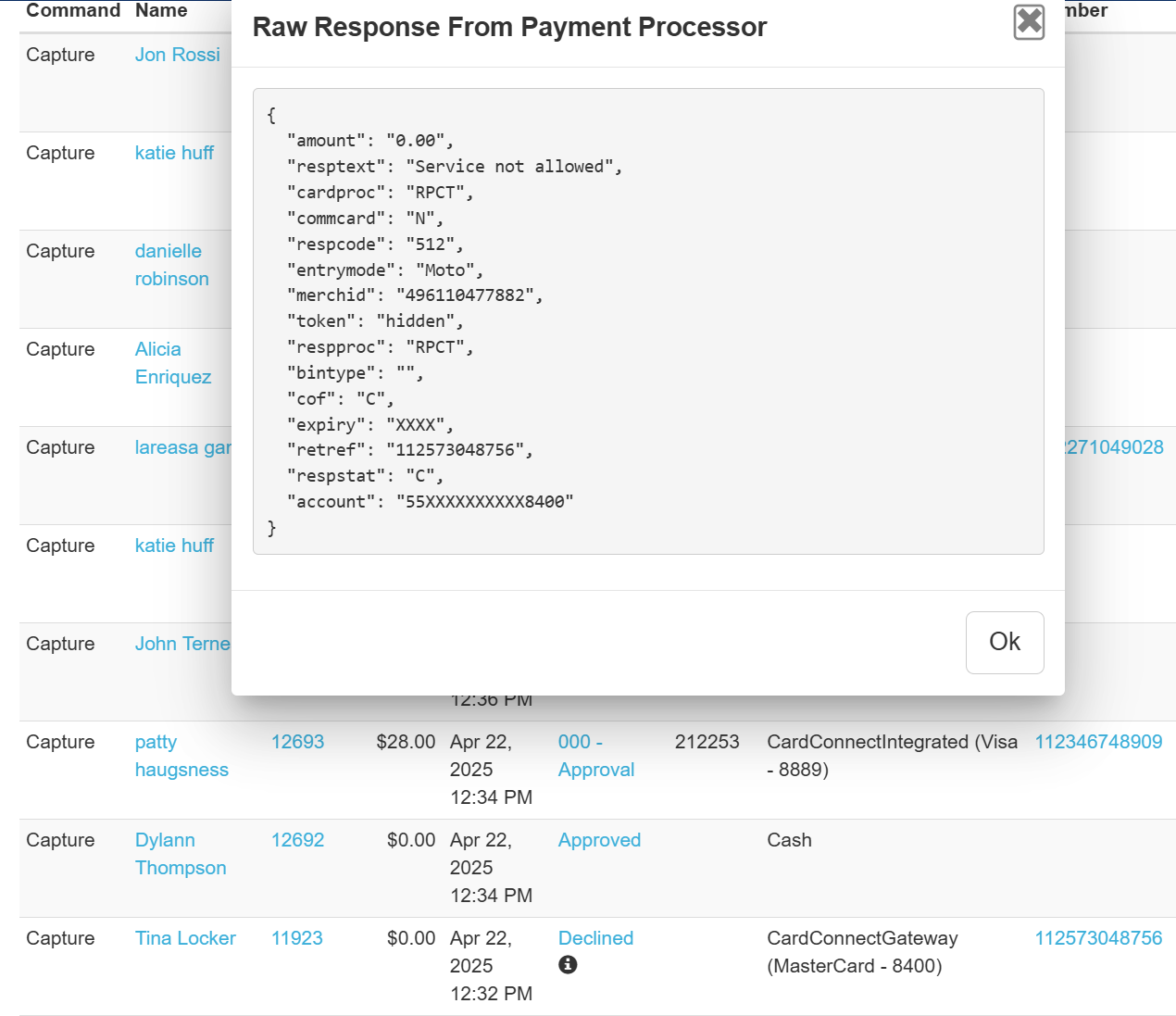
If a customer has an issue with a payment that didn't go through this is almost always the result of the transaction being declined by the issuing bank and there usually is not much HTPOS or you can do about that. You can gather a little more information about the possible reason why it was declined. You can accomplish this by going to Reports \> Payment Reports and searching for the transaction on the appropriate date. It should stand out with a Decline in the report for the given date.
Once you find the transaction you can click on the link attached to the "Decline" and it will pop open a modal with some additional details about the transaction attempt. The example below is for a declined transaction. The response text says "Service not Allowed", this could mean a number of things, but this usually means that the type of transaction you are trying to do is not allowed by the bank. This type of response can occur with corporate cards that have specific business rules around the types of businesses and amount thresholds that might be allowed for making purchases. The customer would need to communicate with their bank or try to provide an alternate payment method.
Other scenarios you might see here would be "Not sufficient funds" or a "CVV2 Failure". If the issue is a CVV mismatch or bad expiration, these can be corrected and might be as result of a typo. But most other scenarios will require the customer to communicate with their bank.
- [FAQs](https://help.hightrekpos.com/kb/faqs?hsLang=en-us)
- [Getting started](https://help.hightrekpos.com/kb/getting-started?hsLang=en-us#main-content)
- [Operating Hours](https://help.hightrekpos.com/kb/getting-started?hsLang=en-us#operating-hours)
- [Products](https://help.hightrekpos.com/kb/getting-started?hsLang=en-us#products)
- [Inventory](https://help.hightrekpos.com/kb/getting-started?hsLang=en-us#inventory)
- [Zoos](https://help.hightrekpos.com/kb/getting-started?hsLang=en-us#zoos)
- [Vouchers](https://help.hightrekpos.com/kb/getting-started?hsLang=en-us#vouchers)
- [PCI](https://help.hightrekpos.com/kb/getting-started?hsLang=en-us#pci)
- [Resources](https://help.hightrekpos.com/kb/getting-started?hsLang=en-us#resources)
- [Custom Calendar](https://help.hightrekpos.com/kb/getting-started?hsLang=en-us#custom-calendar)
- [Capacity](https://help.hightrekpos.com/kb/getting-started?hsLang=en-us#capacity)
- [Troubleshooting](https://help.hightrekpos.com/kb/troubleshooting?hsLang=en-us)
- [General](https://help.hightrekpos.com/kb/general?hsLang=en-us#main-content)
- [POS](https://help.hightrekpos.com/kb/general?hsLang=en-us#pos)
- [Reports](https://help.hightrekpos.com/kb/reports?hsLang=en-us)
- [Accounting](https://help.hightrekpos.com/kb/accounting?hsLang=en-us)
- [Hardware](https://help.hightrekpos.com/kb/hardware?hsLang=en-us)
- [Voucher Creation & Redemption](https://help.hightrekpos.com/kb/voucher-creation-redemption?hsLang=en-us)
- [Voucher Systems & Redemption Workflows](https://help.hightrekpos.com/kb/voucher-systems-redemption-workflows?hsLang=en-us)
- [POS Product Modifications & Add‑Ons](https://help.hightrekpos.com/kb/pos-product-modifications-add-ons?hsLang=en-us)
- [Physical Gift Card Production & Redemption](https://help.hightrekpos.com/kb/physical-gift-card-production-redemption?hsLang=en-us)
- [Bulk Voucher Management & Redemption](https://help.hightrekpos.com/kb/bulk-voucher-management-redemption?hsLang=en-us)
- [Payments & Cash Handling](https://help.hightrekpos.com/kb/payments-cash-handling?hsLang=en-us)
- [Product Setup & Configuration](https://help.hightrekpos.com/kb/product-setup-configuration?hsLang=en-us)
- [Reporting & Accounting](https://help.hightrekpos.com/kb/reporting-accounting?hsLang=en-us)
- [POS troubleshooting](https://help.hightrekpos.com/kb/pos-troubleshooting?hsLang=en-us)
- [Reporting & Data Export](https://help.hightrekpos.com/kb/reporting-data-export?hsLang=en-us)
- [POS Continuity & Outage Preparedness](https://help.hightrekpos.com/kb/pos-continuity-outage-preparedness?hsLang=en-us)
- [Location settings & configuration](https://help.hightrekpos.com/kb/location-settings-configuration?hsLang=en-us)
- [POS Permissions & Transactions](https://help.hightrekpos.com/kb/pos-permissions-transactions?hsLang=en-us)
- [Payments & Account Management](https://help.hightrekpos.com/kb/payments-account-management?hsLang=en-us)
- [Memberships & Customer Management](https://help.hightrekpos.com/kb/memberships-customer-management?hsLang=en-us)
- [Email templates & communication](https://help.hightrekpos.com/kb/email-templates-communication?hsLang=en-us)
- [Sales & Lead Management](https://help.hightrekpos.com/kb/sales-lead-management?hsLang=en-us)
- [Product Scheduling & Availability](https://help.hightrekpos.com/kb/product-scheduling-availability?hsLang=en-us)
- [Membership Management & Subscriptions](https://help.hightrekpos.com/kb/membership-management-subscriptions?hsLang=en-us)
[](https://help.hightrekpos.com/?hsLang=en-us)
[mailto:email@email.com](mailto:email@email.com)
Copyright © 2026, High Trek POS